Physical Address
60 Ekwema Cres, Layout 460281, Imo
Physical Address
60 Ekwema Cres, Layout 460281, Imo


Video editors are consistently seeking for software that helps to turn lengthy footage into a series of short videos that can be shared on social media.
Well, the best option is Vizard AI, which has been marketed as one of the best video-clipping solutions and it tries to automate the manual editing processes.
Just before you start editing your videos, check out this writing to see all you need to know about Vizard AI, its features and uses and how it works.
Vizard AI is an online software site that does an editing of videos and a generation of social clips. It was created to allow non-experts to create video editing of professional quality through the automation of numerous steps in the video editing process.
Basically it takes a longer source video and applies smart algorithms to identify the most appealing portions and repackages them as short vertical or horizontal videos.
Explore the 12 Best AI Market Research Tools for Tech Projects
Vizard is a collection of features that aims at automating video editing and clipping. Its main capabilities are:
Vizard can also automatically scan your footage and identify the most interesting moments and produce clips that are optimized to work with social platform.
For example, one feature “identifies engaging moments, cuts them with one click, and centers key subjects in vertical format, with no manual resizing needed”.
This means you can get ready-to-post vertical videos (Reels, Shorts, TikToks) without manual cropping.
The platform transcribes everything that was said in the video and provides an option to edit the video using the text.
You can trim or cut segments simply by editing or deleting words in the transcript, making video editing “as easy as a doc”. This text-based editing empowers users to refine content without using a classic timeline editor.
Vizard supports captions in more than 100 languages. It is able to automatically create subtitles, and even translate them, making your content available to people all over the world. The conversion of captions into other languages or addition of captions is also easy with just a single click.
This enables you to adjust the aspect ratio of any clip by clicking one time. Vizard is able to automatically adjust a video to any social media format (vertical, square,wide) without losing key subjects. This will make sure that your video is presentable on all sites without manually adjusting it.
Check out to see the 10 Tech Millionaires in Nigeria
Vizard allows you to make or use brand customization templates. It is possible to use the logos, colors and bottom thirds throughout all the clips. The Brand template option assists in keeping all the videos within the brand, which is critical to professional marketers and agencies.
Vizard also offers link-sharing and collaboration after editing. You may create a shareable link to any clip in order to enable your team members or clients to see and comment without exchanging files. This simplifies the processes in case there are several individuals involved.
Beyond basic clips, Vizard includes social-specific tools. It can suggest or even generate emoji overlays, hashtags, and captions tailored for each clip (often referred to as “AI Captions + Emoji” and “AI Social Caption and hashtag” features).
Although not spelled out in text, these features add engagement-boosting overlays and textual suggestions automatically.
Vizard can suggest or insert relevant B-roll footage into your clips. While on-site images show an “AI B-roll” feature, detailed text is scarce. In practice, this likely means it can automatically recommend background footage or animations to enrich the main clip.
ready to tweak everything by hand Vizard also has a standard video editor. You are able to drag clips in a timeline, change the timing and tweak edits to the second. This makes sure that there are senior editors that may jump in when necessary.
All these features are aimed at making the editing of the video less time consuming and less skilled. Vizard is a helpful tool in the content teams, both because automatic functions (highlight clipping, resizing, caption generation) and manual controls (text edit, timeline editing) are combined.
Check out the 10 Best Google Ads AI-Powered Tools to Help Marketers Ad Campaigns
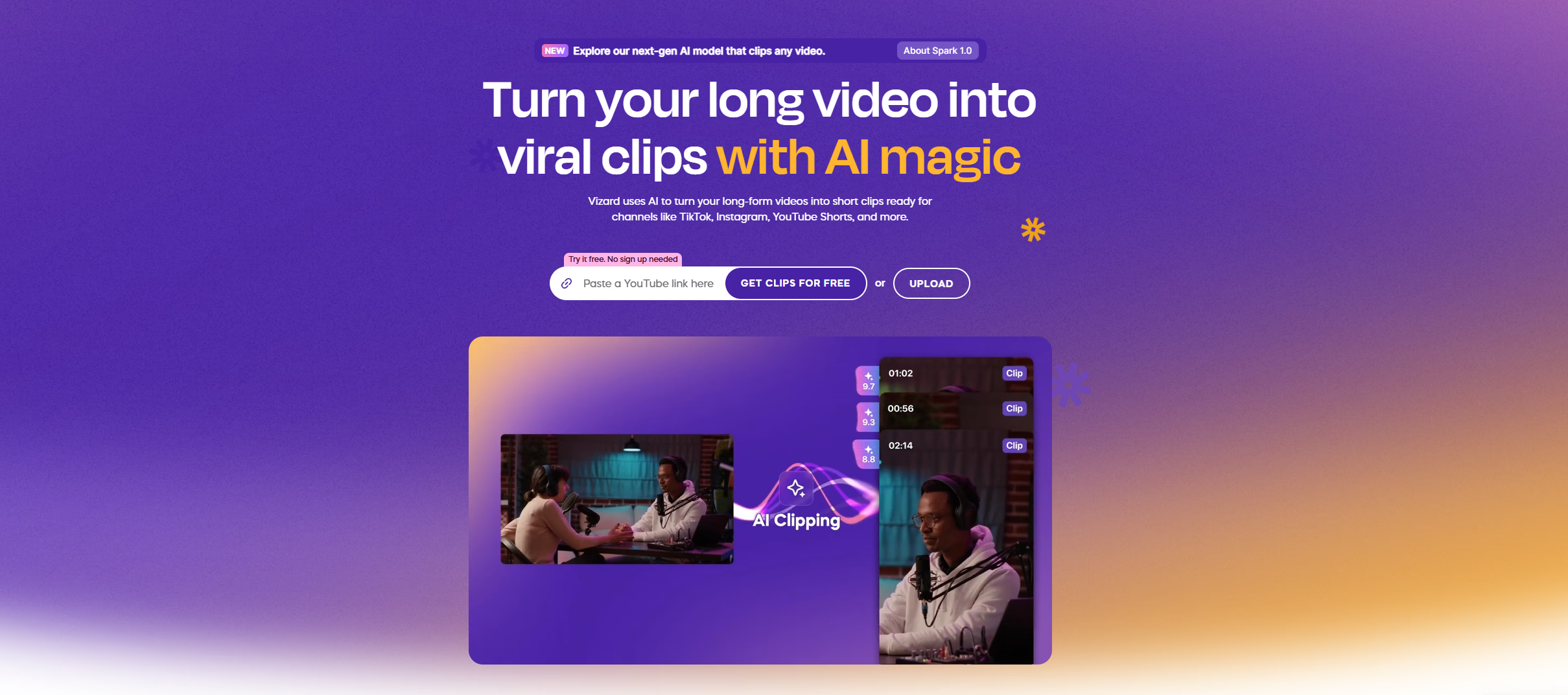
Vizard AI is used primarily to streamline video content creation for online marketing and social media. Typical use cases include:
Vizard enables marketers and influencers to create clips on Tik Tok, Instagram Reels, YouTube Shorts, and Facebook. One can create a long video (such as a YouTube video or a webinar) and instead of editing it manually, upload it and instantly receive dozens of short and vertical clips that are optimized on each platform.
It is emphasized in the marketing of Vizard: turn one webinar into a month of social content. Vizard shortens the content calendar by automating the creation of shareable snippets.
Podcasters and coaches reuse episodes and webinars in the form of small clips. Vizard’s site explicitly targets coaches and business owners, noting that it can clip workshop videos and create bite-sized posts in seconds.
For example, a teacher could plug in a recorded lecture and quickly get highlight reels that learners can watch on the go.
Professionals (trainers, lecturers, consultants) use Vizard to create marketing teasers from longer training videos.
Rather than hiring a video editor, the testimonials on Vizard’s site mention coaches saving time and thousands of dollars using Vizard to produce clips from workshop footage. This makes content more accessible to busy audiences.
Vizard is used by Agencies and Freelance video editors to boost throughput. They are able to work in large blocks of footage automatically as opposed to spending hours on each project.
Vizard claims clients saw a 10x increase in output and massive time savings. Agencies can handle more clients by quickly generating campaigns of short-form video.
Read about 10 Free Tech Training in Nigeria
Its engine understands speech and visual indication hence it is able to cut and reframe scenes where necessary.
But on the user scale, the process is quite straightforward: load some raw videos, press a button and get finished clip results. Besides automatic pipeline, Vizard has in-browser editor, in which you can refine any clip manually.
Some organizations repurpose video archives into new content. By turning older long videos into fresh social clips, they extend the life of existing assets. Additionally, generating transcripts and captions improves SEO discoverability for video content.
Teams use Vizard to collaborate on content. The shared link feature allows editors, clients, and social media managers to review cuts together.
As the site notes, teams from Samsung, Nike, and Microsoft (among others) have utilized Krea (and possibly Vizard by proxy) for scalable creative output.
In essence, Vizard AI is used wherever there is a need to quickly produce a high volume of video clips from longer footage. It is valuable for social media campaigns, educational content, corporate training highlights, and any situation where multi-clip publishing is required.
Read also: What Is Janitor AI? Features, Uses, & How It Works
Vizard operates through a simple three-step workflow, all handled in a browser interface. The process is:
First, the user uploads a raw video file or provides a video URL. Vizard then transcribes the video audio and automatically identifies speakers.
The transcript appears in the editor, enabling text-based navigation of the content. This transcription step prepares the video for analysis and editing, cutting it into logical segments.
Once the video is processed, the user clicks the “Get AI clips” button. Vizard’s system then finds highlights and generates a set of fully formatted clips suitable for different platforms.
In the background, it uses its proprietary algorithms to choose timestamps for each clip and applies the selected aspect ratios (vertical, square,etc.).
This is where Vizard automates what would normally require hours of manual editing. The site says users can “sit back as Vizard generates fully-designed video clips for TikTok, YouTube, Instagram or any platform of your choice”.
After generation, the clips appear in the editor. Users can review the automatically created clips and make any manual tweaks if needed (adding text, fine-tuning cuts, etc.).
When ready, clips can be downloaded or shared via link. The final step is Publish and Share – you simply export or link out the clips.
The system encourages just clicking “download, share as links or publish directly from Vizard” to complete the process. According to Vizard, that’s all it takes – “Voila – your work is done!” with no extra effort.
Behind the scenes, Vizard relies on advanced video-analysis technology to power these steps. Its engine recognizes speech and visual cues, so it knows when to cut and where to reframe scenes.
However, from a user perspective, the workflow remains intuitive: upload raw footage, press a button, and receive polished clip outputs.
In addition to the automatic pipeline, Vizard offers an in-browser editor where you can manually refine any clip. You can trim by editing the transcript, adjust the timeline, change the clip ratio, and apply other edits.
But crucially, none of these steps requires downloading software – everything happens in the cloud. This makes Vizard very accessible for teams and individual creators alike.
See also: Top 15 AI Game Generators
Yes, our online video editor is completely free to use.
if you are on the free plan, your exported videos will have a Vizard.ai watermark
Vizard has 2 different plans: Creator at $14.50 per month. Business at $19.50 per month
As online video content becomes more important, tools like Vizard allow creators, marketers, and organizations to keep up by producing more content faster.
By combining such functions as text editing, branding templates and collaboration, Vizard can be used as a fast clipping application and as a complete editing platform.
To conclude, Vizard AI is an effective video editing tool which takes raw video and can easily produce many ready to be published social clips, thus turning tedious complex editing workflows quick and easy.